


Review of routers for stable home internet?
to read 8 min
How does a Wi-Fi router work and why is it important for a stable internet?
Just 20 years ago, home internet meant wires, complicated connections, and freezing when pages loaded. Today, we just open a laptop or smartphone, connect to the wireless Internet, and we're online. But how does a Wi-Fi router work and what is behind this convenience?
A Wi-Fi router is not just a “box with antennas” but a real network control center. It receives a signal from the provider, distributes the Internet among all devices, determines who needs how much speed, and can even affect the quality of the connection. If the Internet goes down, it's not always the provider's fault - often a reboot or correct settings can solve the problem.
Equipment
Communication on which you can rely
Stable internet and maximum speed anywhere in your home or office.
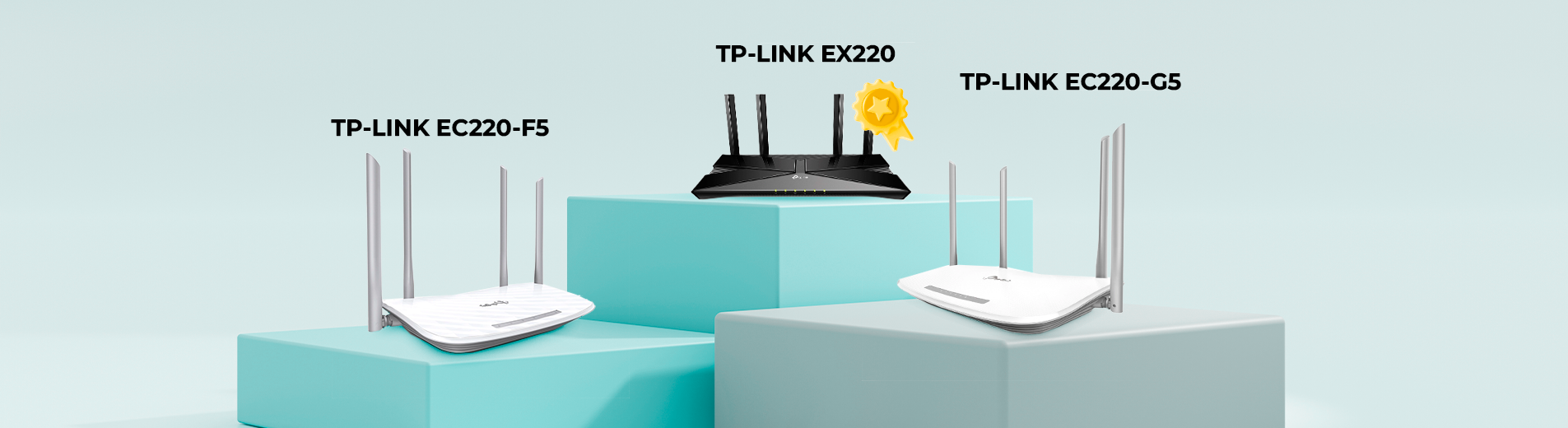
TP-Link EC220-F5, EC220-G5, and EX220 specifications and comparison
To keep your home internet working stably and without interruptions, it's important to choose the right wireless Wi-Fi router, taking into account its technical characteristics and your own needs. Let's take a look at what three popular models from TP-Link offer, namely the EC220-F5, EC220-G5, and EX220, and which option will be the best solution for your network.
Don't forget that when you buy a router from BRIZ, you get a complete turnkey service - the price already includes delivery and setup by our technicians. All BRIZ equipment is warranted for 6 to 24 months.
| Parameter | TP-Link EC220-F5 | TP-Link EC220-G5 |
TP-Link EX220
|
|---|---|---|---|
| Wi-Fi Standard | 802.11ac (Wi-Fi 5) | 802.11ac (Wi-Fi 5) |
802.11ax (Wi-Fi 6)
|
| Antennas | 4 external antennas | 4 external antennas |
4 external antennas
|
| Interface | 1 WAN port 10/100 Mbit/s | 1 WAN port 10/100/1000 Mbit/s |
1 WAN port 10/100/1000 Mbit/s
|
| LAN Ports | 3 LAN ports 10/100 Mbit/s | 3 LAN ports 10/100/1000 Mbit/s |
4 LAN ports 10/100/1000 Mbit/s
|
| WAN Type | Dynamic IP, Static IP, PPPoE, PPTP, L2TP | Dynamic IP, Static IP, PPPoE, PPTP, L2TP |
Dynamic IP, Static IP, PPPoE, PPTP, L2TP
|
| Wi-Fi Speed | 2,4 Ghz: 300 Mbit/s 5 Ghz: 867 Mbit/s |
2,4 Ghz: 300 Mbit/s 5 Ghz: 867 Mbit/s |
2,4 Ghz: 574 Mbit/s
5 Ghz 1201 Mbit/s |
| Technology Support | Multi-SSID | MU-MIMO, Beamforming |
MU-MIMO, TX Beamforming, Airtime Fairness, DL/UL OFDMA, Multi-SSID
|
| Mesh Technology | No EasyMesh compatibility | EasyMesh compatibility |
EasyMesh compatibility and 802.11k/v/r support (seamless roaming)
|
| External Power Supply | 12 V/1,0 А | 12 V/1,0 А |
12 V/1 А
|
| Price | 1499 UAH | 1799 UAH |
2699 UAH
|
Which Wi-Fi router is right for you?
Is your Wi-Fi not working properly and you've decided to replace your router? Let's consider which option is suitable for your wireless Internet:
- TP-Link EC220-F5.
A good option for small apartments or studios where the Internet is used for basic tasks. The maximum speed of 100 Mbps will be enough for surfing, watching videos, and comfortable Internet access. However, if you have many devices that connect simultaneously, you should consider other options.
- TP-Link EC220-G5.
The best option for medium-sized apartments or private homes where several devices are connected to the internet at the same time. The maximum speed of up to 1000 Mbps provides fast and stable connection for online gaming, work, watching 4K video, and other intensive tasks. Thanks to the support of MU-MIMO and Beamforming technologies, the router ensures even signal distribution among all devices. And thanks to EasyMesh compatibility, you can integrate it into your existing network and get seamless coverage over a large area.
- TP-Link EX220
Top-of-the-line option for large homes, apartments, or offices that need high-speed gigabit Internet. The router supports the latest Wi-Fi 6, MU-MIMO, Beamforming, and OFDMA technologies, which allows you to provide fast and stable Internet over a large area with many connected devices. Mesh makes it easy to create or integrate a seamless wireless coverage system in every corner of your home. If you need not only a stable connection for work or school, but also high intensity for streaming video in the best quality and online gaming, this router provides optimal conditions for all your needs.
How to configure and optimize your router?
For stable internet, it's not enough to just connect a cable - you need to set up your wi-fi router correctly. You can find available configuration guidelines on the BRIZ Internet provider's website or in the article “How to replace an old router with a new one by yourself”.
After replacing the router, pay attention to a few things:
- Correct location of the router
Install the device in the central part of your apartment or house, away from walls and obstacles. This will improve coverage and provide wireless Internet without dead spots.
- Change the default password and network name
A complex password will help you avoid unauthorized connections that can slow down your home internet speed.
- Optimize the frequency range
Some devices work better on 2.4 GHz, while others work better on 5 GHz. If your Wi-Fi isn't working or your speed is slow, check the frequency settings on your router.
- Ensure uninterrupted internet service
To ensure that the Internet at home does not disappear during power outages, choose GPON and connect the router and ONU using UPS.
Receive information about promotions and news from BRIZ to your email address

Be the first to comment