


How to replace an old router with a new one by yourself
to read 7 min
How to choose a new router, how to connect it instead of the old one, and how to configure everything correctly so that your Internet works quickly and smoothly? Let's figure it out together.
Why do I need to replace my router?
There are various reasons why you may need to replace your old router with a new one.
Router failure
A power surge, the use of a low-quality power supply, or prolonged use of the router can cause it to malfunction.
Outdated router model
Another reason for replacement is that your router may no longer be modern.
In apartment buildings, it often happens that the Wi-Fi network is overloaded because neighboring routers interfere with your wireless connection. Each router has its own channel for Wi-Fi. However, if the channels of different routers overlap and work together, this will lead to interference and a decrease in the quality of the connection.
This is called “interference”, and it slows down your internet experience. This applies not only to phones, but to any device connected to your Wi-Fi network (laptop, tablet, or TV and other smart devices).
If the router does not support the current Wi-Fi standards, it negatively affects the operation of all devices connected to it. Your devices may be new and support modern wireless technologies, but the router may simply not provide them.
There are many options, but only one solution. To improve the quality of your wireless network, we recommend using a dual-band router.
How to choose a new router?
1. By the type of connection (WAN)
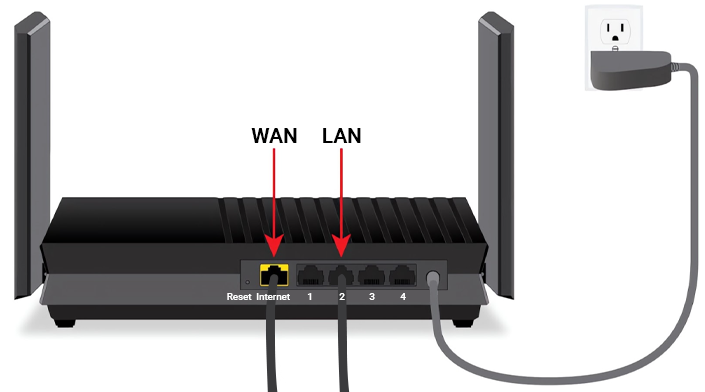
If your provider is BRIZ, you will need a standard router (with RJ-45 ports). We use a regular Ethernet connection to the Internet through a network cable.
There are other ways to connect a router, but they are not used in our network:
- using a telephone cable (DSL router with an RJ-11 connector);
- connection by USB modem.
2. Internet speed depending on the tariff
If your tariff speed is more than 100 Mbps, or if you want to increase the speed in the future, you should purchase a router with gigabit ports (10/100/1000). Check the manufacturer's website or the router for more information.
3. By support for Wi-Fi standards
It is recommended to consider a router that supports the 802.11ac standard, also known as a dual-band router. It will be very important to have Wi-Fi 6 (802.11ax), which is the latest Wi-Fi standard that is now used almost everywhere.
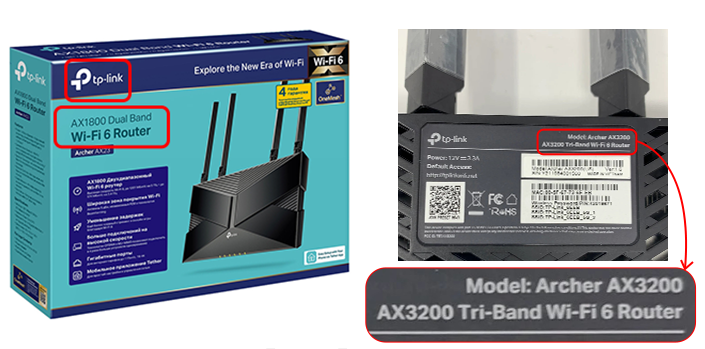
4. To increase the range and number of connected devices
You need a device that supports MU MIMO technology. It allows you to serve many devices at the same time without reducing productivity. For example, when the whole family gathers at home in the evening, several phones, a laptop, and a TV are connected to Wi-Fi. This technology provides fast Internet access to all devices.
The MESH system provides stable coverage throughout your home, even in remote locations. Automatically switches devices between access points to ensure the best signal. It is perfect for large apartments or houses with many rooms and several floors, offices.
Anyway, every case is individual. Before buying a new router, it's best to consult with technical support.
What settings to configure on your new router
Depending on your provider, the steps may differ. If you've connected a new router and still don't have internet access, you may find the following information useful.
PPPoE or IPoE? Let's understand how to set up a router
Before you start setting up your new router, you need to understand what type of connection you use: PPPoE or IPoE (Dynamic IP). PPPoE is usually used for copper cable connections, while IPoE is exclusively used by GPON technology. You can get this information from your provider.
If you need PPPoE, prepare your login and password from your provider - you will need them to get access. Do not forget that for a successful connection, you will need to change the MAC address of the old router to a new one in your Personal Account or by contacting technical support.
It is much easier with IPoE - the settings are pulled up automatically, and you don't have to enter anything manually. However, keep in mind that some routers still require you to log in to the admin panel and select Dynamic Connection.
Find out how to set up your router in a flash right now!
What to do with your old router?
1. Wi-Fi signal range extender (repeater).
You can set up your old router as a Wi-Fi signal booster. This way you can increase the coverage area of your wireless network. You can find information here.
2. Network switch
If you need more Ethernet ports to connect your devices, you can set up your old router as a network switch. This will allow you to connect more gadgets to your network.
3. Configure different network functions or test new configurations.
If you are interested in network technology, you can use your old router for experimenting and learning.
Conclusion
There are many reasons why you may need to replace your router. It could be a technical failure, poor wireless network performance, or you just want to upgrade your router. In such cases, replacing your router becomes a necessity, but it's not always easy to figure out on your own.
We recommend you to contact the technical support, and they will help you choose the best option for a new router, guide you through the setup process, and tell you where to place your router in your home. In addition, they will advise you on the best tariff plan for your needs.
BRIZ is always ready to help you! Contact us on our website for a quick solution to all your questions.
Receive information about promotions and news from BRIZ to your email address

Be the first to comment