


Causes of slow Internet access
to read 7 min
Problems with your Internet connection are always annoying. There are many factors that can affect the stability and speed of the network. Today, we're going to look at what to do if the Internet doesn't work as you want it to, the most common causes, and how to fix them.
What can you do before you start to figure it out?
First, run a speed test using our website or other services, such as Speedtest from Ookla.
The results will help you understand how much the connection differs from the tariff plan. Speed tests should be performed on different devices to eliminate any device-specific difficulties.
Devices connected by an Ethernet cable (computer, laptop) have faster speeds because they are connected directly to the router.
However, devices connected over Wi-Fi may be slower due to the nature of wireless Internet technology, low signal strength, and interference in the radio network. To make sure your network is stable, try running a packet loss test with Ping.
Ping is a command that checks if your computer (or phone) can communicate with another device over the Internet or local network. It sends a small message and waits for a response, measuring how long it takes. Ping helps you find out if there are difficulties with your Internet connection and where they might be.
How can you ping on a computer (on Windows 10)?
- Open a command prompt: Hold down the Win + R keys simultaneously.
- In the window that appears, type cmd and press Enter.
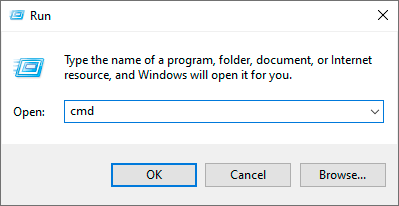
- Perform a ping to check the connection to the router: At the command prompt, type ping 192.168.0.1 -t and press Enter.
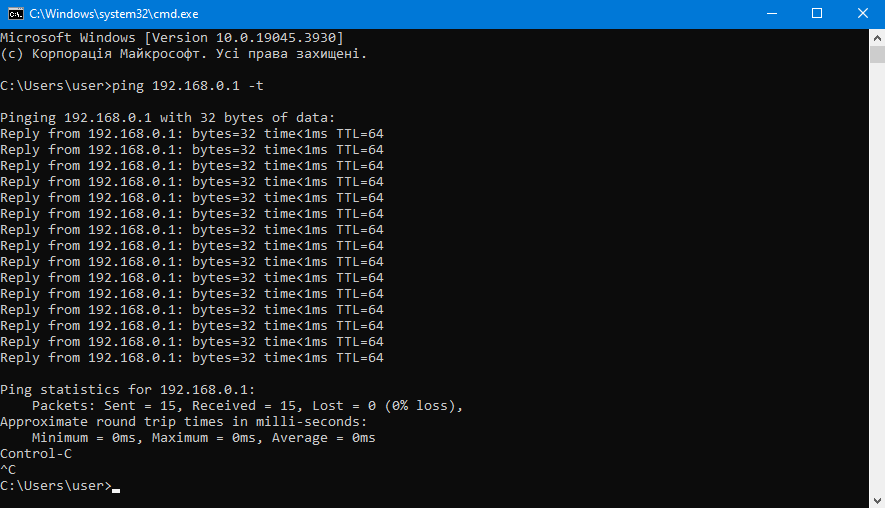
- To finish the test, you need to hold down Ctrl + C.
This is a test to see if your computer can establish a connection with the router. If there are long delays or the ping fails, it means that there are obstacles between the PC and the router.
- At the command prompt, type ping 8.8.8.8.8 -t and press Enter.
8.8.8.8.8 is the IP address of the Google server. This test checks if your router can connect to the Internet. If there are long delays or the ping fails, this may be due to incorrect router settings, difficulties in the local network, or technical work by your internet provider.
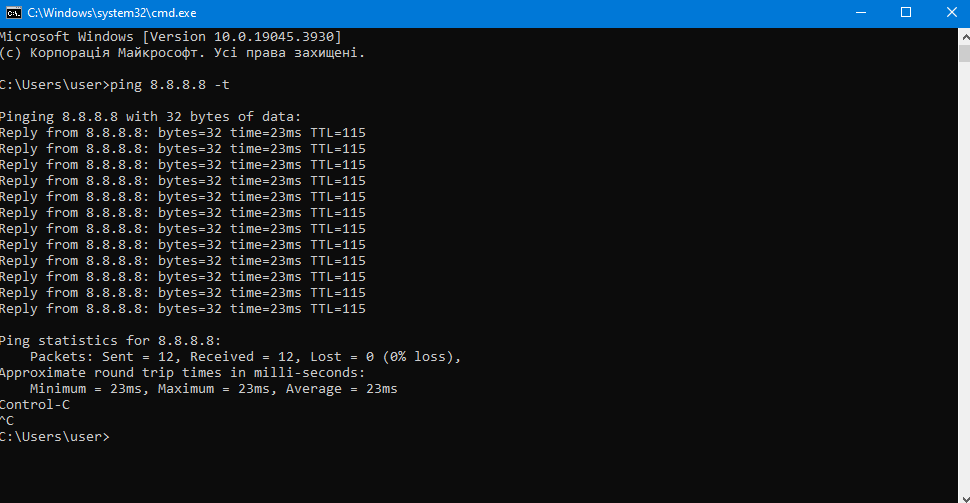
- To complete the test, press Ctrl + C.
How do I check for Wi-Fi?
You can use Ping (Android / iOS) to check this on your phone or tablet.
Delays over Wi-Fi are always slightly higher than over cable. However, significantly higher delays (e.g., more than 100 ms) may indicate a clear problem with your Wi-Fi. The reasons could be obstacles, a long distance to the router, network congestion, or old equipment.
We recommend that you periodically check the quality of your internet connection to make sure everything is working smoothly.
Technical reasons that affect your internet

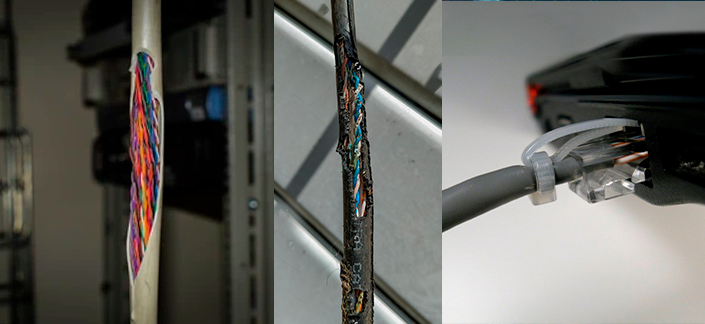
1. Cable: Damaged or old cables can cause a lack of connection or a significant decrease in speed.
If the cable has twists or kinks, this can lead to oxidation of the contacts and, as a result, loss of Internet access.
A connector in less than perfect condition may not transmit an electrical signal, indicating insufficient contact. This prevents the router from receiving an IP address from the provider, and the connection simply fails.
2. Router: If your router is not configured properly, is overloaded with too many connected devices, or has technical problems, it can significantly affect your internet reliability.
Incorrect settings can cause conflicts with IP addresses. If the router handles too many devices at once, it may not be able to handle the load, resulting in delays and speed losses.
If the router has firmware problems, you may notice that the Internet disappears for a while and then reappears. This means that the device interrupts the connection and needs to reboot or take some time to get a new IP address.
In order to avoid such situations, you can familiarize yourself with the current router models on our website. Our technical support is always ready to help you choose the best router for your use!
3. Incorrectly selected tariff plan: Do you have several routers and many devices connected to them? If the tariff has a low speed, you will have difficulties regardless of the connection via cable or Wi-Fi. This is especially noticeable when streaming or watching videos, playing online games, or making a video call.
To avoid such situations, you should choose a tariff with a higher bandwidth. Detailed information about our tariffs can be found here.
4. Wi-Fi: A radio signal is a less reliable connection than a cable. It depends only on the router and surrounding obstacles such as walls and metal, mirrors, etc.
To improve stability and increase network coverage, we recommend using the Mesh system. You can learn more about it in our article, and see the available equipment here.
5. System updates, background processes, or viruses can use a significant amount of traffic.
External causes that affect your internet.
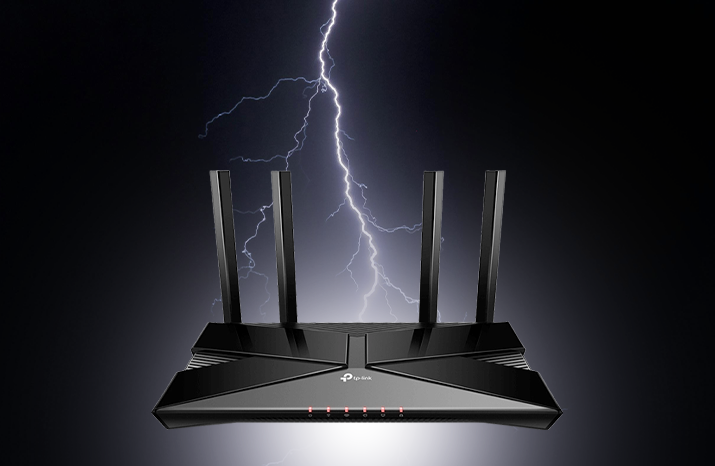
1. Weather: It does not affect the quality of your internet or Wi-Fi, but there are some exceptions.
A thunderstorm affects the operation of your router. It can cause an electrical outage, which can burn out the WAN port or power supply, and, as a result, the router will not be able to access or simply not switch on.
But there is a solution: a power surge protector can help against voltage surges.
Strong winds can break the cables that go to your home or connect apartment buildings.
2. Provider: Sometimes the issue may be on the part of the service provider, as repairs, upgrades or emergency works may be carried out. You can check the website for up-to-date information.
What can you do to make the Internet better right now?

1. Upgrade your tariff plan: Check out the possibility of upgrading to a faster tariff plan. Tariffs above 100 mbps require gigabit equipment on the client's side.
2. Optimize your router: Try updating the firmware of your router, use new Wi-Fi standards if your devices support them. It is advisable to place the router in the centre of your home to have better coverage.
3. Use of cabled connections: Cable connections provide a more stable and faster connection than Wi-Fi.
4. Mesh Wi-Fi: A Mesh system can significantly improve coverage in larger homes by using multiple devices to create a single network.
Receive information about promotions and news from BRIZ to your email address

Be the first to comment