


How to increase internet speed on phone?
to read 7 min
- Why may the internet be slow on my phone?
- How do I set the network type on iOS and Android?
- The main reasons for slow mobile internet
- How can you increase the internet speed on your phone as quickly as possible?
- How to quickly restore the Internet in hard-to-reach places, such as a bomb shelter or basement?
Today, all smartphone owners use mobile internet. It is often used even when distributing Wi-Fi signals to various gadgets. There are many ways to increase the speed of the Internet on iOS and Android operating systems. In this article, we'll figure out why the Internet on your phone is not working properly, how to speed up the mobile Internet, and how to increase the Wi-Fi speed.
Why may the internet be slow on my phone?
The speed of the Internet on your phone is regulated by your network operator and the type of connection you choose. For example, modern smartphones offer 3 types of network settings: 2G, 3G and 4G.
How do I set the network type on iOS and Android?
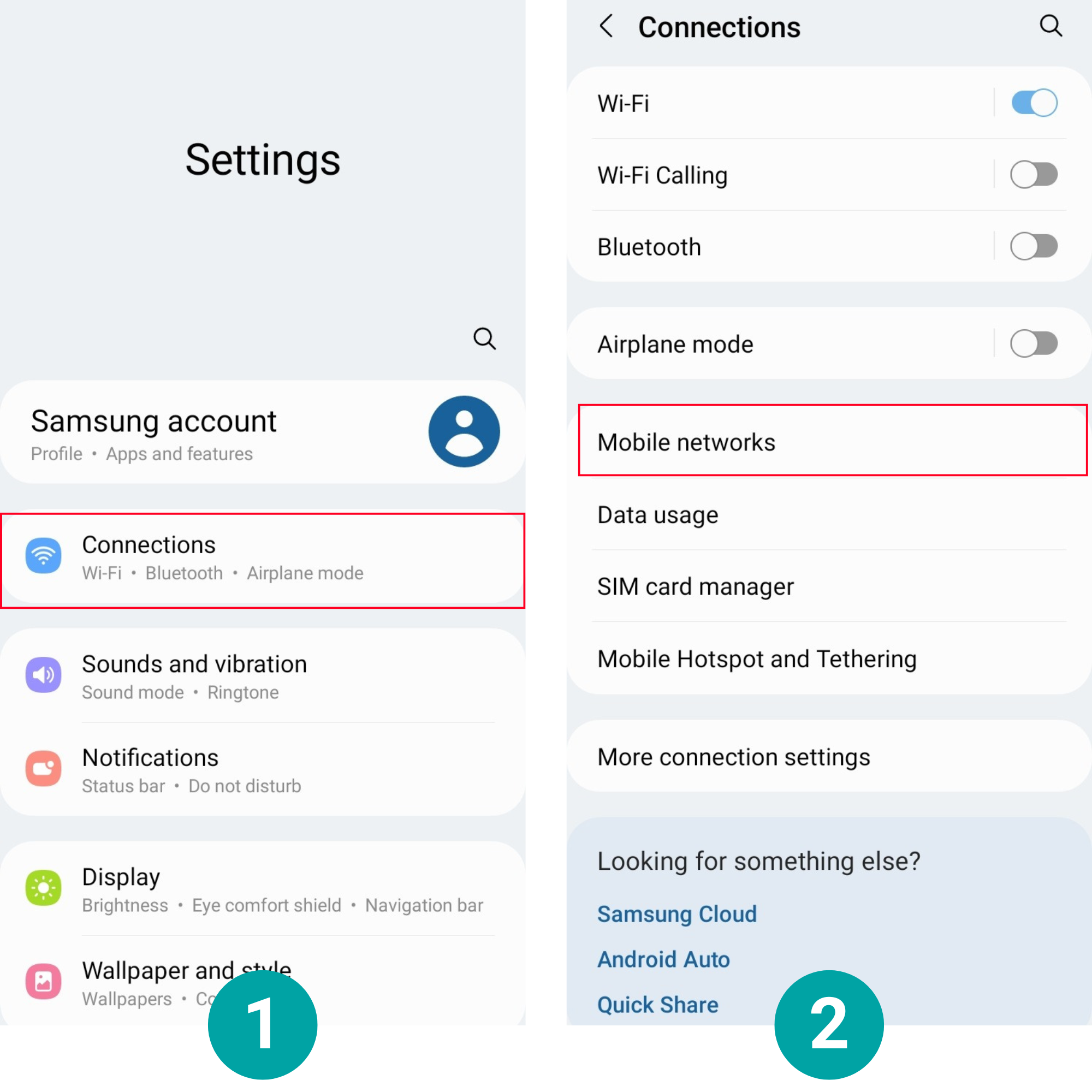
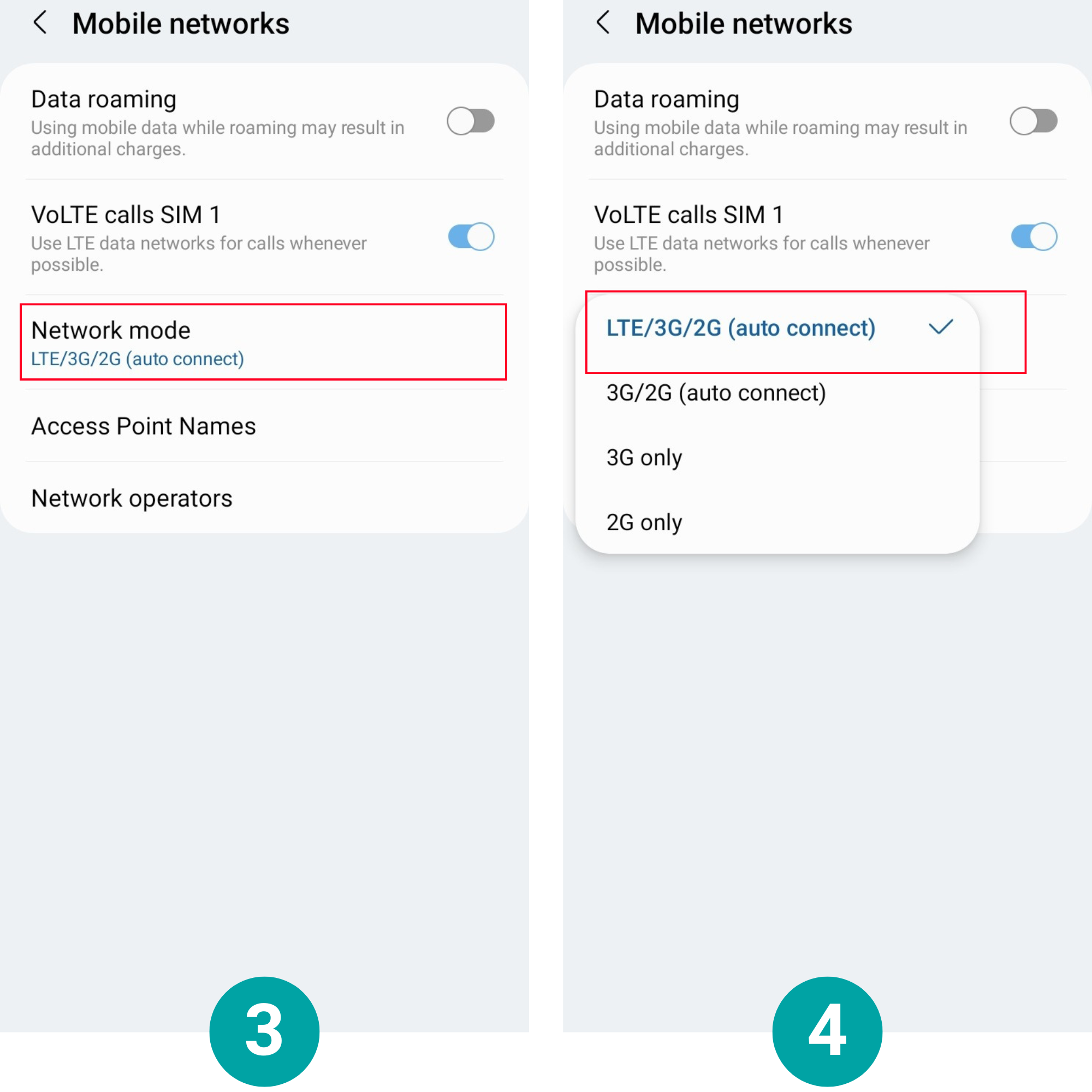
Setting up the mobile network for Android
- Go to "Settings" and go to the "Connections" section, then select "Mobile networks".
- Find "Network mode". Click on it and select LTE/3G/2G (auto-connect).
Setting up your network for iOS
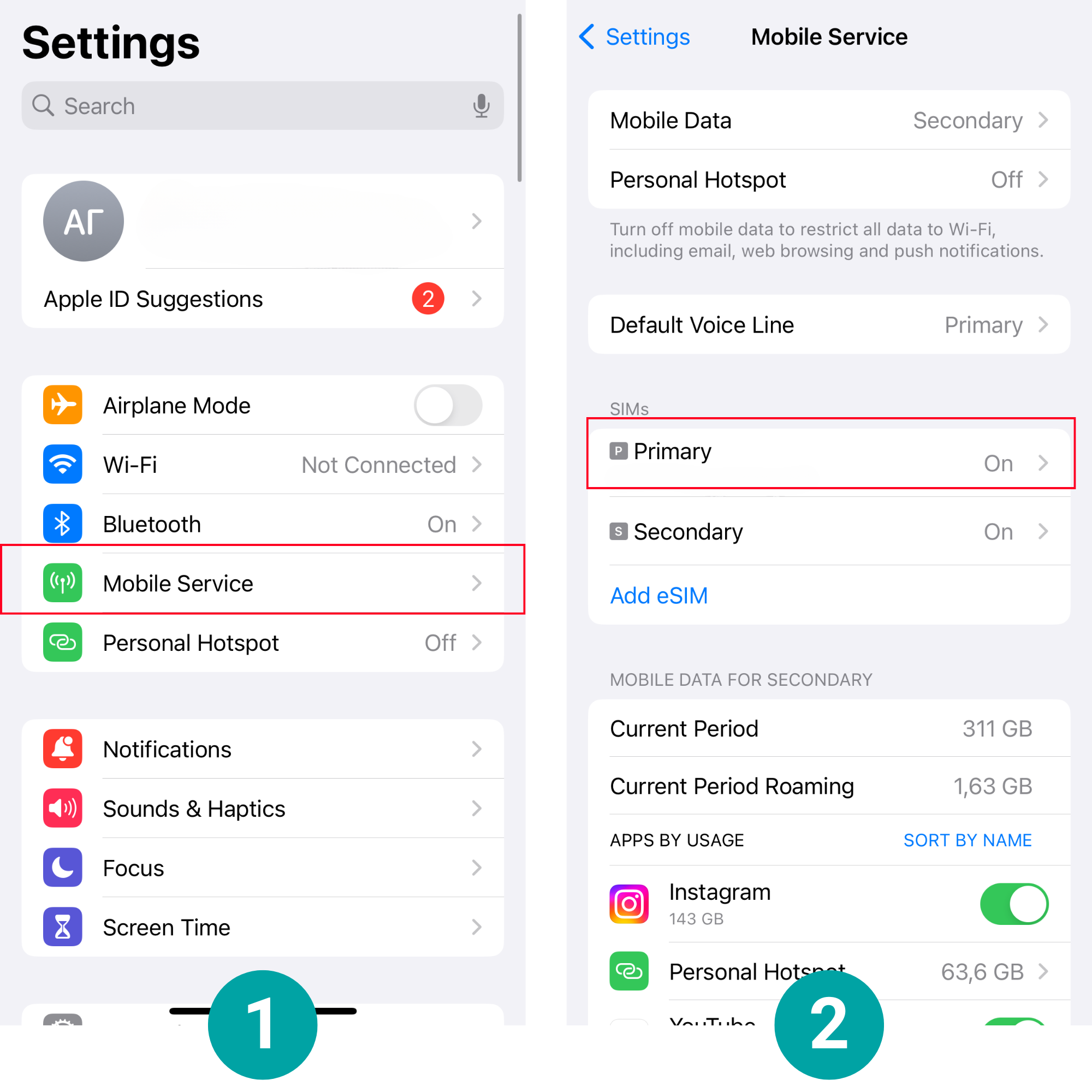
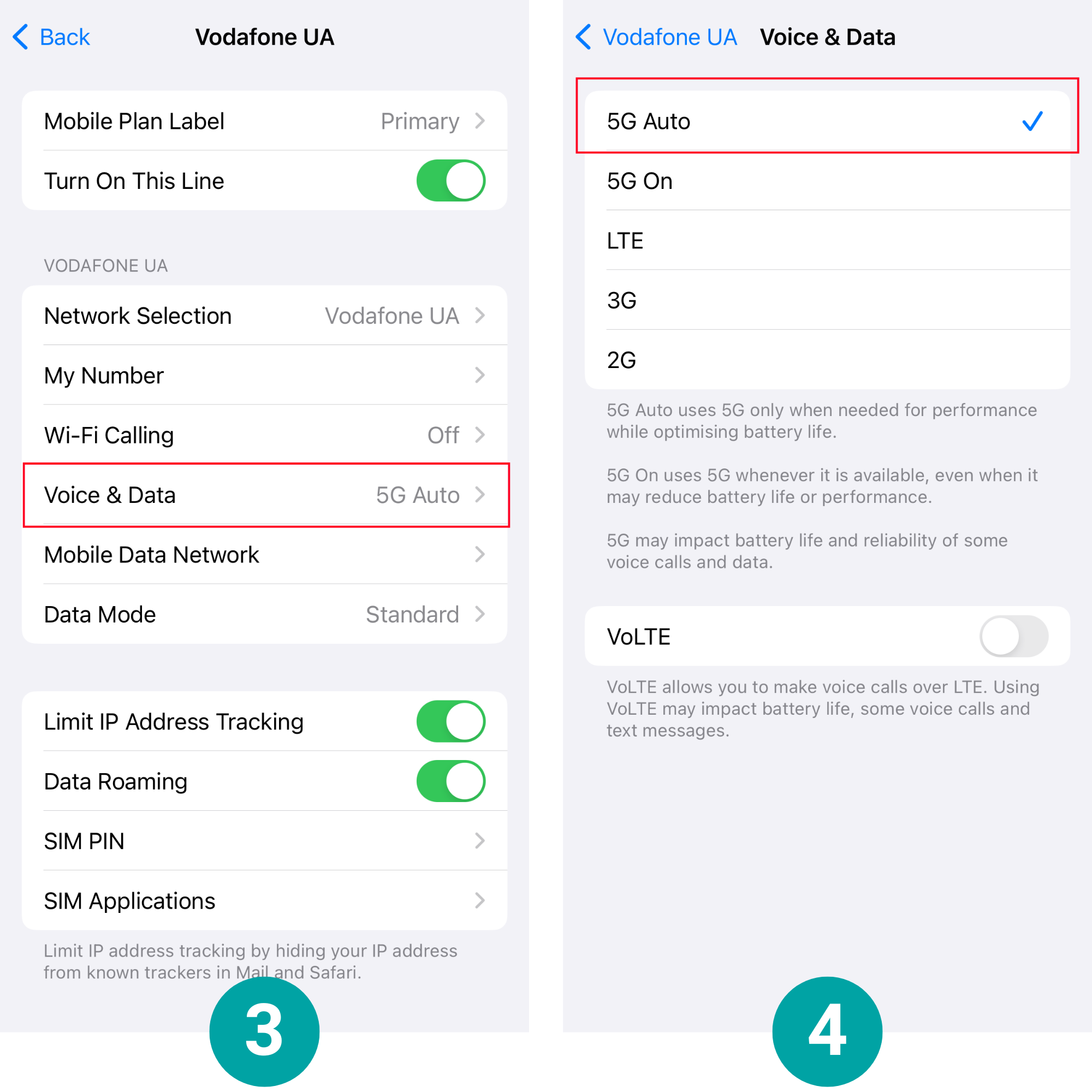
- Go to Settings and find the "Mobile Service", which will allow you to configure your network.
- Once in this section, in the "SIM cards" bar, click on the "Primary".
- After these steps, the settings for the main SIM card on your iPhone will open.
- You need to select "Voice and data" and set "5G Auto".
Low internet speed may be due to the fact that the phone model is outdated and does not support the new LTE (4G) network. Such devices can only work with 2G or 3G networks.
The main reasons for slow mobile internet
There are several reasons why a user has poor internet on their phone:
- technical problems on the part of the service provider;
- the user is in an area with low-quality mobile coverage;
- applications running simultaneously and thus consuming internet traffic.
How can you increase the internet speed on your phone as quickly as possible?
If your phone's Internet speed is slow, you should check the device for all its parameters and capabilities, which are listed below.
4G (LTE) connection instead of 3G/2G
In new gadgets, the 4G (LTE) network type is set by default, but in older models, the network is 3G or 2G. We have written instructions for setting the network type on iOS and Android above. You can speed up the Internet on your phone by using a forced connection.
Remove apps and widgets that are not in use
Some applications run in the background, and there are often situations where the Internet speed and phone performance are reduced because of them. They increase additional internet consumption, so it's important to get rid of all the apps you don't use on your phone and keep an eye on open tabs. It is also worth paying attention to the widgets on your desktop, as they can also affect the work of your smartphone.
Browser optimization
Browser optimization includes a compression mode used by most Android owners, where once activated, all pages will be filtered through Google's servers and displayed in a compressed form, thereby saving up to 30% speed.
Reboot your phone
Sometimes, the best way to increase the speed of the Internet on your phone is to simply reboot it. Existing mobile operating systems are somewhat similar to Windows: if a device is running continuously for a long period of time, it will eventually slow down and require a reboot. By doing so, the performance and efficiency of the device will be restored to 100%.
The right place for a Wi-Fi router
If you are using a Wi-Fi connection, the slow internet speed on your phone may be due to the data transmission over the network. Determine the best place in the room for your router, where nothing will interfere with the signal. Also, ensure that the distance from the router to all devices connected to it is the same.
Clear the cache of apps
Apps have a tendency to build up cache, which can lead to slow internet on your phone and slower apps, so it's important to clear it in time.
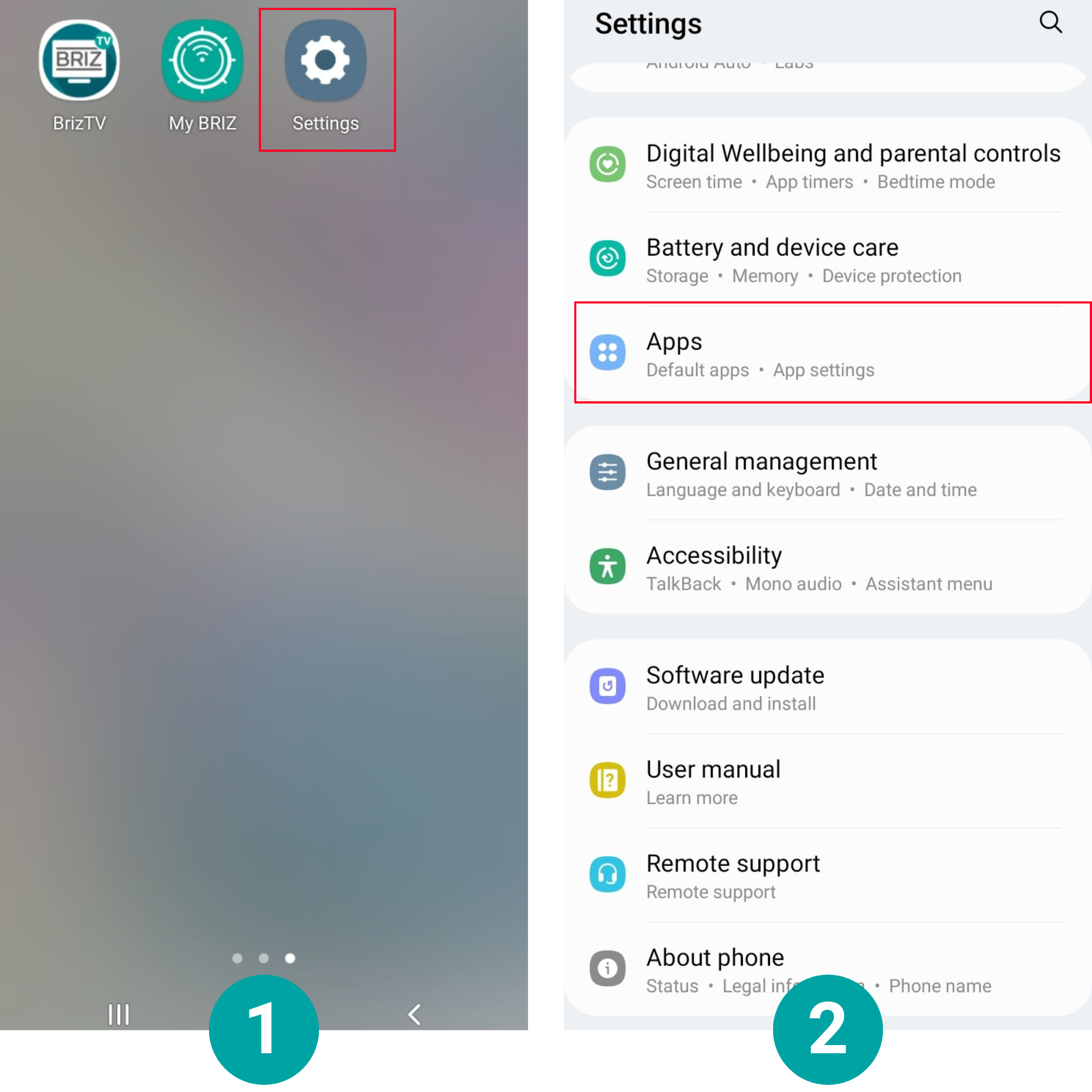
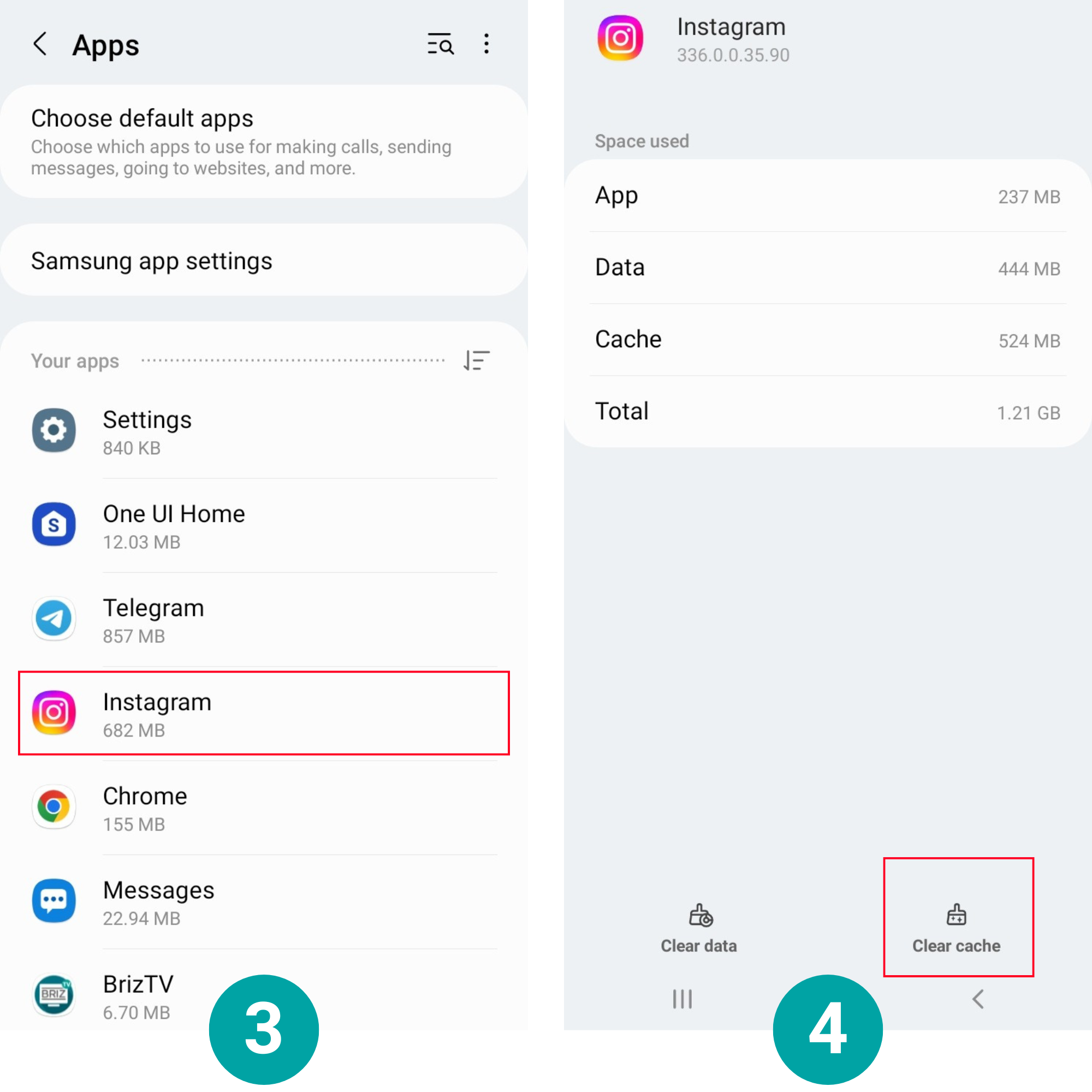
How to clear the cache on Android:
- Go to the "Settings" menu and tap on "Apps".
- Next, select and open the required application. Click on "Clear cache".
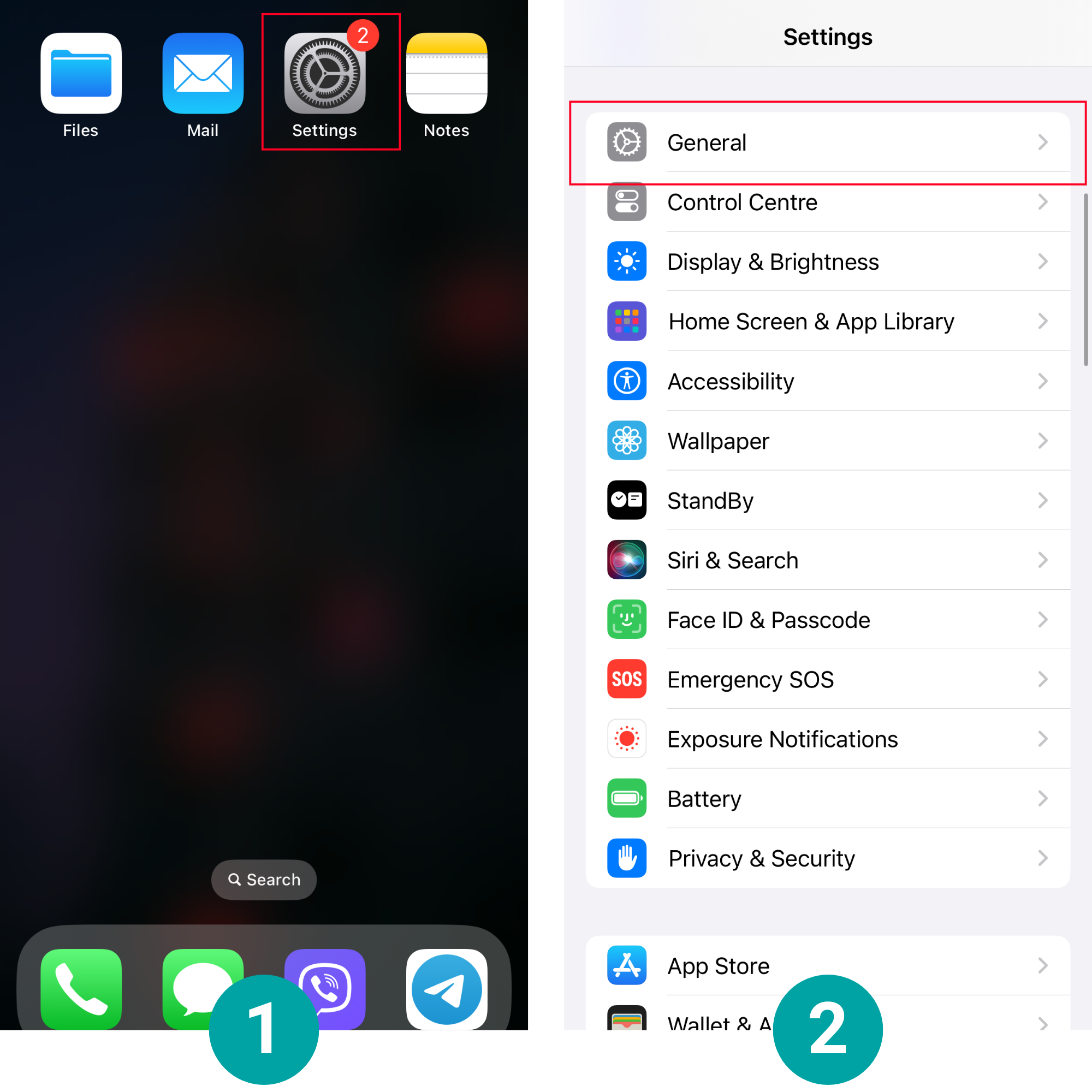
Clear the cache on iOS:
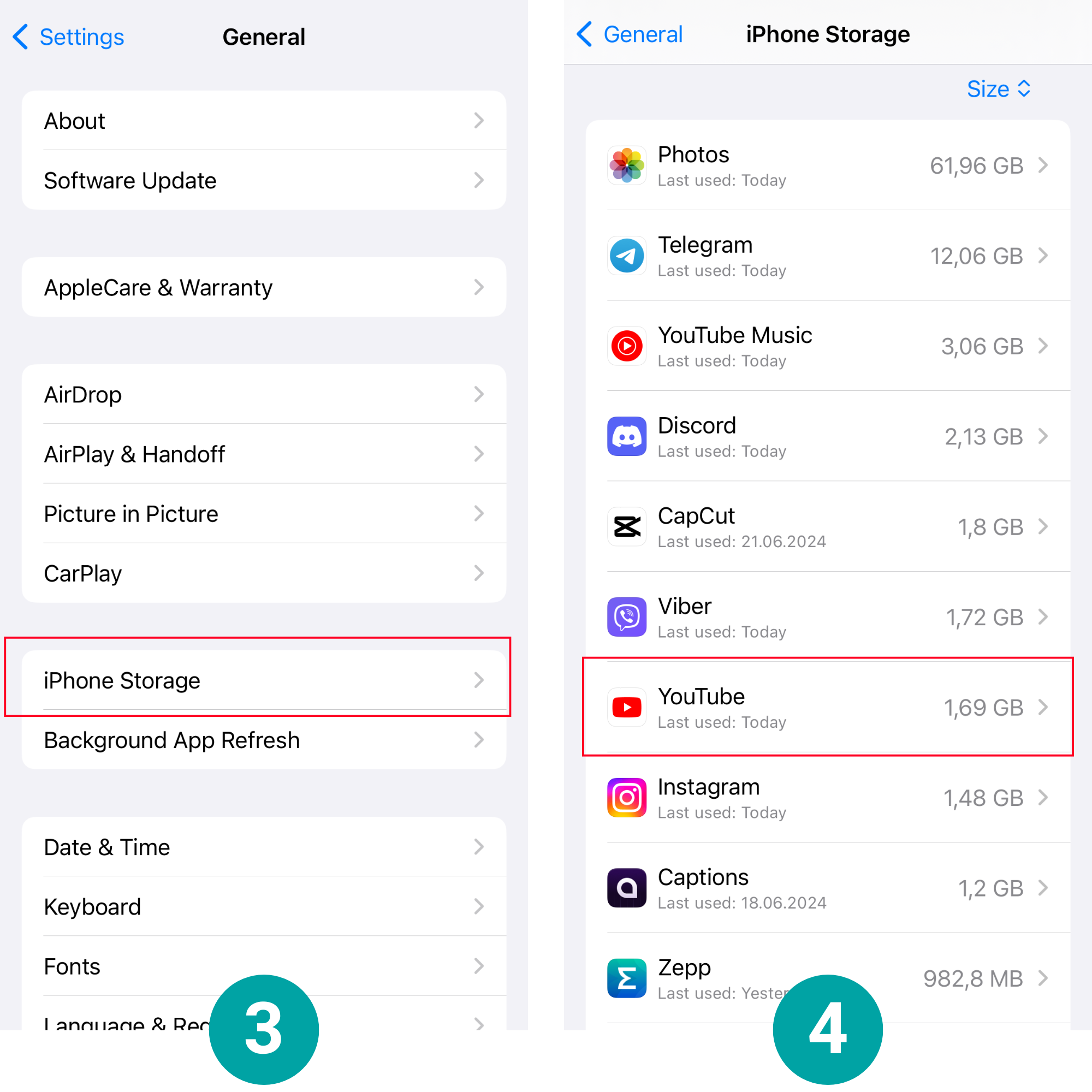
- Go to the "Settings" section, open "General", then "iPhone Storage".
- When you go there, you'll see all your apps and the amount of data they accumulate. Not all apps allow you to delete the data, but most of them can be cleared from the cache, thus freeing your device from unnecessary files that take up memory.
Thanks to all these methods, you will no longer need to think about how to improve your phone's performance or how to increase the speed of the mobile Internet.
How to quickly restore the Internet in hard-to-reach places, such as a bomb shelter or basement?
No Internet access on your phone when you're in a basement or a bomb shelter? Nowadays, this situation is not unusual, but you need to understand that for many people, staying in the constant communication space is not just a need, but a vital necessity.
If your phone doesn't have cellular service and mobile Internet is not available, you can try to connect Wi-Fi by positioning your router so that its signal reaches the place where you are.
If you have any problems connecting to or using the Internet, you should contact your provider.
In the modern world, being online is a requirement for many people. Mobile Internet helps to cope with this task. In order to ensure that the network speed is always satisfactory, you must first choose a tariff that will meet all your requirements.
If you have any questions about connecting, choosing a tariff, etc., please contact your mobile operator's support line.
Receive information about promotions and news from BRIZ to your email address

К Константин B BRIZ
О Олег B BRIZ
Load more29.05.2024
У меня получилось улучшить интернет на телефоне только после очистки кеша, а 4G и так всегда был подключен.
30.05.2024
Чистка кеша може дійсно допомогти в покращенні роботи мобільного інтернету, а 4G це додатковий плюс для стабільності сигналу.
30.05.2024
Ребята, столкнулся с такой проблемой: плохо работает мобильный интернет на новом телефоне, хотя со старым всегда всё было ок. Пытался ускорить всеми способами из статьи, даже не знаю, что из перечисленных методов помогло, но ситуация немного улучшилась.
30.05.2024
Дякуємо за Ваш відгук! Ми завжди раді допомогти нашим абонентам.